
WordPress updates, whether manual or automatic, always raise questions and even fears among webmasters. These updates are necessary for the security and scalability of your site, but they also entail risks. So should you activate WordPress automatic updates? Let's explore the issues.
Contents
Manual updates
Whatever your update method (manual or automatic), the risks are there.
On the whole, regardless of whether the update is automatic or manual, you will sometimes run into problems that need to be dealt with, sooner or later.
What are the risks of WordPress updates?
From simple bugs to site inaccessibility, here are the most common problems:
- Action required Update: Sometimes an update requires manual intervention to adjust certain parameters or configurations.
- A plugin or theme has a bug An update can introduce a malfunction, especially if the plugin or theme is no longer maintained by its developers.
- Version incompatibility A plugin or addon depends on another plugin and may not be updated as frequently, creating conflicts.
How to reduce risk
To avoid these risks and inconveniences, a staging process is necessary: this consists of trying out each update in a test environment before applying it in production. However, this practice requires considerable time and resources, which is not feasible for even the most modest sites.
Automatic updates
What are the advantages of automatic WordPress updates?
Switching to automatic updates saves time and increases security.
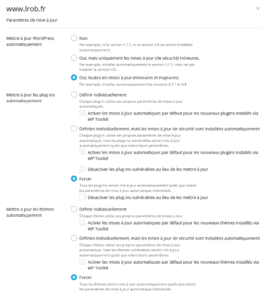
This is done in a few clicks from your Plesk control panel. You can disable automatic updates for any plugins that are causing problems.
1. Increased safety
By activating automatic updates, your site is protected against the latest security flaws as soon as they are corrected. This reduces the risk of piracy and keeps your site safe without systematic manual intervention.
2. Save time and energy
Automatic updates reduce the need for frequent intervention. Instead of manually checking for new versions of plugins or WordPress, you save precious time that can be reinvested in higher value-added tasks.
3. More minor bugs
Thanks to regular updates, the bugs you encounter will be smaller overall, simply because the changes are more minor. What's more, diagnosis will be simpler: if one plugin is causing a problem, you'll be able to quickly work out which of the few recently modified scripts is causing the problem, whereas if all the plugins have been updated, you'll have to test them all one by one.
Requirements for automatic updates
With automatic updates, there are even more important prerequisites than with manual updates.
1. Automated and outsourced backups
Backups are essential in some cases. It is therefore important to have regular, outsourced back-ups with a long retention period. These back-ups must be selectively and easily restorable.
On the LRob web hosting, In the event of a problem, we carry out a host backup going back up to 1 year.
2. Site monitoring
You should monitor the response of your sites and check them manually from time to time.
Via our LRob web hosting, we monitor the correct response from each hosted site.
3. Availability
You need to react quickly if necessary, to prevent a problem lasting on your site. And you need to have the right tools to diagnose (access to logs, phpMyAdmin, file explorer, deactivation of plugins from the hosting panel - all available on the LRob web hosting). Your LRob support can help you diagnose and solve your problem, by getting involved in WordPress research and diagnostics.
What should I do if I have a problem with a WordPress update?
If an update causes a problem, you need to react quickly and effectively:
- View logs Server logs can quickly indicate the source of the problem.
- Deactivate the offending plugin : If you can do without it, deactivate the plugin concerned.
- Adjust the settings : Sometimes a simple setting change is enough to resolve the problem.
- Developer support Contact support for the plugin or theme concerned to report the problem and get help.
- Restore a backup If the problem is critical and has no immediate solution, then a backup restore may be necessary. In this case, it may be a good idea to temporarily suspend (automatic) updates until a solution is found. If you don't have a backup on your side, your LRob support can restore its host backup.
- Contact your LRob support We manage a large number of sites, so it's highly likely that we've already spent hours resolving a similar problem, or that our experience will enable us to find your solution very quickly. We're always happy to help you save time!
In short: manual or automatic update?
Manual update
By updating manually, you delay the appearance of problems that you will have to resolve sooner or later, while exposing yourself to more security holes.
This choice may be appropriate for very complex sites, subject to potential bugs and requiring more extensive monitoring.
Automatic updates
If you're using an auto update, you run the risk of a temporary bug, so you need to deal with the (rare) problems as soon as they appear.
The exception: complex sites
The exception is large, complex sites, such as WooCommerce with custom dev, where in this case it's better to staging and testing each update (every 3 months at the most, or when a known security flaw appears), for an appropriate maintenance fee.
With a professional hosting service, such as the one offered by LRob, You can also take advantage of technical support and extended back-ups, up to a year in the past, to make your site more secure in the event of unforeseen events.
Conclusion
Overall, we believe that automatic updating should be your default choice, because security takes precedence over functionality. If you're agile, then this shouldn't be a problem. Because it's better to have a bug to fix than a hacked site and all its consequences to deal with. Small and medium-sized organisations will often benefit more from automatic updates, while more complex sites require specific, in-depth maintenance management.
If you're ready to adopt automatic updates, make sure you have backups and a monitoring strategy in place to deal effectively with the rare incidents that do occur.
👉 For simplified management of your WordPress site, discover accommodation offers LRob and benefit from our expertise to avoid or resolve technical problems and keep your site online, secure and performing.
Leave a Reply
You must be logged in to post a comment.