
Is your web hosting too slow?
The technological and hardware choices made by your web host have a direct impact on the performance of your website. Yet most hosting providers are vague about their infrastructure and actual performance. As a customer, you often don't know what you're paying for.
At LRob, We're trying to do better. Much better. We have a transparent approach: we measure, compare and optimise every parameter, every hardware choice, to guarantee a loading speed of up to 10x faster than the competition. Our aim is to offer you the fastest specialised WordPress web hosting. And because we're proud of the results, we're happy to share them with you.
In this article, we'll be revealing our CPU and IOPS (NVMe SSD) benchmarks to explain how we choose our servers. We'll show you what really makes the difference in web performance.
Contents
What are the criteria for a high-performance web host?
A web infrastructure is made up of several elements. Between software, hardware, choice of infrastructure and policy on filling, monitoring, anti-robot measures... All this will have an impact on the final speed of your site.
While you as a webmaster certainly have your part to play in optimising your website (and LRob can help you with this), the web host plays a central role that you can't cut out.
Let's take a look at what makes up a web server, and the impact on performance of each component. And let's take a look at LRob.
Software components
There aren't that many pieces of software on a web server. However, they can have a drastic impact on final performance.
Here is a summary of the different software components and their impact.
Front-end server (Apache, nginx, LiteSpeed, etc.)
This is the HTTP(S) server itself. It communicates directly with the outside world, and its support for new technologies such as HTTP/3 or Brotli compression can improve the loading speed of visitors. The nginx and LiteSpeed servers are considered to be the most efficient, where Apache is the most compatible.
- At LRob, we combine the best of both worlds, with Apache on the «back end» and nginx on the «front end», using a fairly common technical trick called «reverse proxy». This maximises performance and compatibility at the same time, while adding support for HTTP/3 and Brotli compression and file caching, thanks to nginx.
Front-end server configuration Beyond the support or otherwise of new HTTP standards such as HTTP/3, two main criteria stand out: the maximum number of clients connected simultaneously, and the lifespan of a connection. This directly determines the maximum number of visitors supported. Other criteria, such as the nginx file cache, may also come into play.
- LRob intelligently optimises these limits so that they have the maximum value supported by the hardware, without saturating CPU or RAM resources. The configuration also allows nginx file caching in addition to system caching. The values can be increased on request for specific cases.
Database server (MySQL, MariaDB)
The database is called up each time a page is visited on the site. Using a more recent version of MySQL or MariaDB and optimised configurations will improve performance. MariaDB is generally considered to be the most open source and the most powerful. The two are generally inter-compatible.
- LRob servers currently use MariaDB 10.11 and MariaDB 11.4.
Database server configuration MySQL and MariaDB have numerous settings, such as the maximum size of a query or the size of the cache in RAM. None of the hosting providers mention this. However, good, generous RAM settings can boost database performance tenfold.
- At LRob, the innodb buffer is at least 32GB, which means that almost all databases can be included in server RAM for maximum performance.
PHP versions
Each new version of PHP has been faster than the previous one for some years now. If your site and web host are compatible, then you should always opt for the latest version for maximum performance.
- PHP 8.4 is the latest version, already available from LRob at the time of writing.
PHP handler (CGI, FastCGI, FPM, LSPHP, etc.)
The PHP handler or «connector» provides the link between the front-end server and PHP. This can have a drastic impact on performance. FPM and LSPHP are the two best performers.
- LRob uses FPM with a dedicated instance per site rather than a general instance on the server.
Configuring the PHP handler The PHP handler will determine the limits of PHP itself (for example the maximum execution time of a script, or the maximum amount of RAM that can be used by a script), but also the number of simultaneous PHP threads that can run, which ultimately determines the maximum number of visitors you can serve in a given time - a criterion that also depends on the final speed of your site.
- At LRob, PHP limits depend on your accommodation offer. They are indicated in complete transparency and are sized in accordance with the dimensions of your offer. Note that a PHP-FPM thread on a powerful server can serve more pages per second than on a less powerful server. So even with the initial LRob (Starter) package, which offers just 2 FPM, you can serve several thousand pages per minute (over 7,500 pages/minute) with a well-optimised site.
RAM Cache Support
RAM cache support (Redis, memcached): If your site and host are compatible, this can boost your site's performance tenfold by storing your pages and requests in server RAM.
- LRob provides a Redis cache as standard on all its hosting services.
Hardware components
The hardware behind web servers makes a major difference to the final load speed. Several components interact.
The CPU
The server processor will directly determine the computing power available.
This can be summed up in 2 parts: Single-thread power and multi-thread power. In other words, the amount of work that can be done on a single task running on a single processor core, and the total amount of work that can be done on all processor cores at the same time.
Roughly speaking, single-threaded power determines the speed of your site when there is only one visitor, while multi-threaded power determines the maximum number of visitors you can accommodate. Note that when you use all the multi-threaded power, you reduce the single-threaded power to a greater or lesser extent depending on the type of CPU used, as we'll see in the following benchmarks.
- In 2025, LRob chooses 12 to 16 cores (24 and 32 threads) processors from AMD, which offers the best raw performance according to our various measurements.
RAM
RAM stores server programs and CPU calculations. The more RAM a server has, the more cache it can hold (MySQL, Redis, nginx, files) and the more PHP processes it can run. Once again, this affects the maximum number of simultaneous visitors and the performance achieved.
- In 2025, LRob is opting for servers with 128GB of RAM as standard, so that it will never run out and will benefit from very generous caching to avoid any slowdown.
Storage IO
Storage capacity is not a criterion of speed on a web server. Instead, we measure IO speeds, i.e. disk input-output speeds.
Any reading or writing of files that are not in server RAM will use IO, whether it's a MySQL request or reading your site's PHP and multimedia files. This can have a monumental impact on the speed of a site, especially where MySQL is concerned, which is generally the most sensitive to the number of random operations each second (particularly for writing, which cannot be cached in RAM).
The traditional hard disk is the slowest, followed by SATA SSDs, and then NVMe SSDs, which are the fastest. In the case of virtualised servers, the disks, whatever their form, can be deported to a SAN. In the case of a SAN, the storage is no longer local, which can lead to a reduction in throughput and an increase in access latency.
- In 2025, LRob will be opting exclusively for servers with NVMe SSDs in local RAID (the fastest available) so that it never has to wait for disk accesses!
Choice of IT architecture
There are two types of server available from your hosting provider:
- Dedicated servers
- LRob only uses dedicated servers.
- Virtualised servers
A dedicated server is a «normal» physical machine that hosts services.
A virtualised server is a sub-server created from a larger machine. This is known as a «VPS» (virtual private server) or «VM» (virtual machine), each with its own operating system. This gives the host greater versatility, but costs more in terms of RAM and disk space, and there may be a drop in performance due to virtualisation and the number of systems to be run.
The servers can then be deployed in different ways:
- Classic LAMP (Linux Apache MySQL PHP) server: everything is on the same machine (dedicated or virtualised)
- LRob uses only traditional and local LAMP servers on dedicated servers.
- Cluster: each application is separated on a different machine (dedicated or virtualised)
The second method is more versatile and can support higher total traffic levels and economies of scale on large volumes, with the potential for service redundancy. On the other hand, it adds complexity to the architecture and can have a significant cost in terms of performance. Because each machine is separate, it creates latency due to the network and the different protocols used, for each file access, each MySQL request and each PHP execution. What's more, the hardware used is generally a processor with many cores (32 or more) but low performance per core.
Used to excess, LRob believes that clusters are only really necessary when there are tens of thousands of visits per minute, for example for social networks or government websites. For the average person with one or more websites, the main effect of clusters will often be to reduce performance.
Especially since, as you'll see at the very end of this article with a load test on the «Copines de bons plans» site, you can already make more than 12,000 visits per minute on 2 FPM processes at LRob... And many more on higher offers, provided your site is very well optimised.
Note: Although the LRob infrastructure is based on dedicated servers, the packages you order on the LRob portal are shared services. They are certainly high-performance shared services, more powerful than what you will find on a VPS or even a low-cost dedicated server, but technically they are shared services, meaning that several sites and users are on the same physical machine.
Filling and blocking attacks: server load management
The server load is the average use of machine resources. The aim is to have the lowest possible average load, with the highest possible reserve of resources. This allows the servers to withstand peaks in traffic and load. For example, when one of your articles is very popular on the web, or you are mentioned on TV or radio, we try to avoid server saturation at all costs.
You can often tell by the fluctuating performance that hosting providers have servers full to bursting, to maximise their profitability. What's more, they don't necessarily effectively block attacks by pirate robots, which on low-traffic sites can account for up to 95% of the load. Imagine, 95% of your hosting resources occupied by robots... Don't imagine, that's what can happen without protection.
The reason why most web hosts don't block bots is, in my opinion, a strategic choice: on the one hand, it encourages customers to switch to dedicated servers or higher packages (because of slowness), and on the other hand, blocking attacks sometimes generates false positives, i.e. customers who block themselves and therefore request support, which most web hosts don't want to deal with.
In practice, an overloaded server such as we often see causes constant or occasional slowness on your site.
At LRob, we strive to offer maximum performance at all times. To achieve this, we apply a strict policy:
- The objective is not to exceed 25% at average load and 50% at peak load.. If this happens : Reduce the load at source (block attacks? optimise a site?) or migrate the heaviest and/or most popular sites to a new machine.
- Blocking attacks at different levels, to save up to 95% of useful resources, while protecting your websites from attacks.
- Intelligent FPM process limits, so that no site overloads the servers
- Systematic contact with owners of slow or very popular sites to propose optimisation solutions sites and reduce server load
- 24/7 monitoring server performance and direct intervention in the event of anomalies
Hardware performance: The technology gap
As we have seen, the choice of hardware can play a drastic role in performance. Today, we're going to focus on the two essential elements for translating the performance of a website: CPU processing power and disk read/write performance (IO).
Computing power (CPU)
We measured a fairly varied panel of servers to get a representative idea of what can be obtained depending on the type of server chosen.
Today's test: Geekbench 6.4, gives you a good idea of the computing power of your machines.
Click here to find out more about cores and threads.
The «CPU cores» each provide a unit of computing power for a program that would only be able to use a single core. Modern processors have several cores. When all the cores are used at the same time, performance per core drops (due to other limiting factors, such as power consumption and temperatures, RAM speed, or the speed of the CPU's internal caches).
To determine whether an application is capable of using one or more cores, we speak of a «monothread» or «multithread» application. Some applications fall somewhere in between.
MySQL is multithreaded.
Apache and nginx are a single-multithread mix: each thread corresponds to a file upload or HTTP session.
PHP is also a single-multithread mix: each thread corresponds to the execution of a PHP page (if several scripts are called, they will remain locked in a thread). In other words, a single visitor can only use one CPU core at a time.
It's clear that for maximum performance, you need at least 2 cores, otherwise all these programmes will have to share a single CPU core. And if you're expecting visitors, you'd better have a lot more, and choose high-performance cores!
So here are the machines that are going through the Benchmark mill today:
- VM 2 Intel Xeon cores at PulseHeberg
- VM 2 Intel Xeon cores at Hetzner
- VM 2 ARM cores at Hetzner
- VM 4 cores AMD Epyc at Hetzner
- Dedicated server AMD Ryzen 9 3900 12 cores 24 threads at Hetzner (server in production)
- AMD Ryzen 9 5950x 16 cores 32 threads dedicated server from Hetzner
- AMD Ryzen 9 5950x 16 cores 32 threads personal computer (for control, manual overclocking 4.4Ghz fixed)
- VM 8 cores AMD Ryzen 9 9900x at PulseHeberg
And we will measure three values:
- Single Thread performance, i.e. the raw power of a single processor core. This corresponds to performance when a single task is running (which determines the best speed for loading a single web page when the server is idle).
- Multi-thread performance, i.e. the total power supported. This has an impact on the maximum number of simultaneous visitors.
- Multi Thread performance per core, i.e. the performance you can expect when the server is running at full load. This is obtained by dividing the Multi Thread performance result by the number of CPU cores.
Raw data, with LRob shared web servers in bold:
| CPU | Single | Multi | Per core | Link | Remarks |
|---|---|---|---|---|---|
| VM 2 cores Intel Xeon E5-2680v4 PulseHeberg | 817 | 1262 | 631 | https://browser.geekbench.com/v6/cpu/10256420 | |
| VM 2 cores Intel Hetzner | 749 | 1355 | 677,5 | https://browser.geekbench.com/v6/cpu/10256916 | |
| VM 2 cores ARM Hetzner | 1099 | 1975 | 987,5 | https://browser.geekbench.com/v6/cpu/10256650 | |
| VM 4 cores Epyc Hetzner | 1489 | 5012 | 1253 | https://browser.geekbench.com/v6/cpu/10267600 | |
| Dedicated Server 12 cores 24 threads AMD Ryzen 3900 | 1747 | 9345 | 778,7 | https://browser.geekbench.com/v6/cpu/10256473 | Server in production, low load, result slightly lower than actual |
| Dedicated server 16 cores 32 threads AMD Ryzen 5950x | 2273 | 12012 | 750,7 | https://browser.geekbench.com/v6/cpu/10256332 | |
| Personal PC Ryzen 9 5950X Desktop | 2076 | 14209 | 888, | https://browser.geekbench.com/v6/cpu/10256353 | For control. Manual overclocking 4.4Ghz & Watercooling |
| VM 8 cores AMD 9900X PulseHeberg | 2877 | 11214 | 1401,7 | https://browser.geekbench.com/v6/cpu/10256848 | Out of stock |
Graphics:
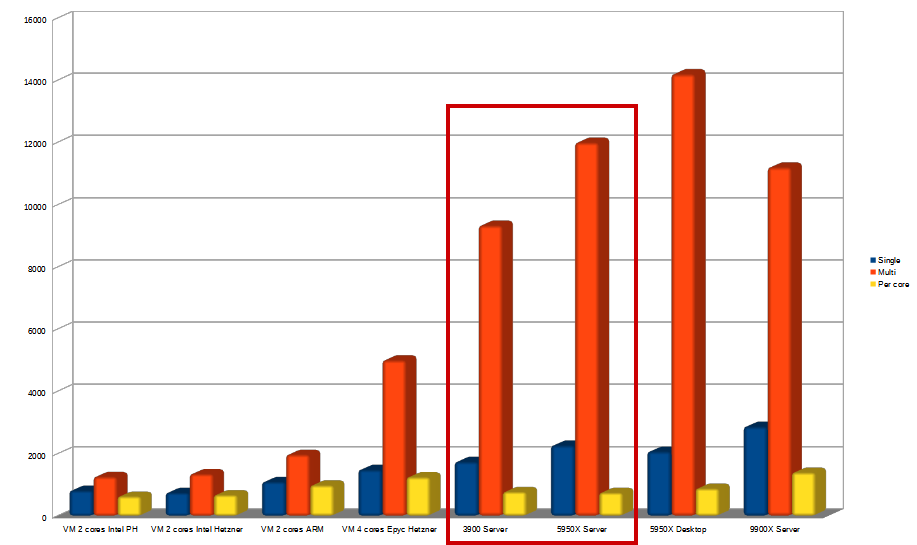
A number of conclusions can be drawn.
Single thread performance
As a reminder, single thread performance will directly affect the perceived speed of your website. This is the most critical and often the most neglected, because traditional web hosts often tend to choose very large processors, with many cores, but little single thread performance. As a result, they can host many sites, but each individual site will be slower.
And the difference can be major, because our measurements show that the speed almost quadruples (x3.841)!
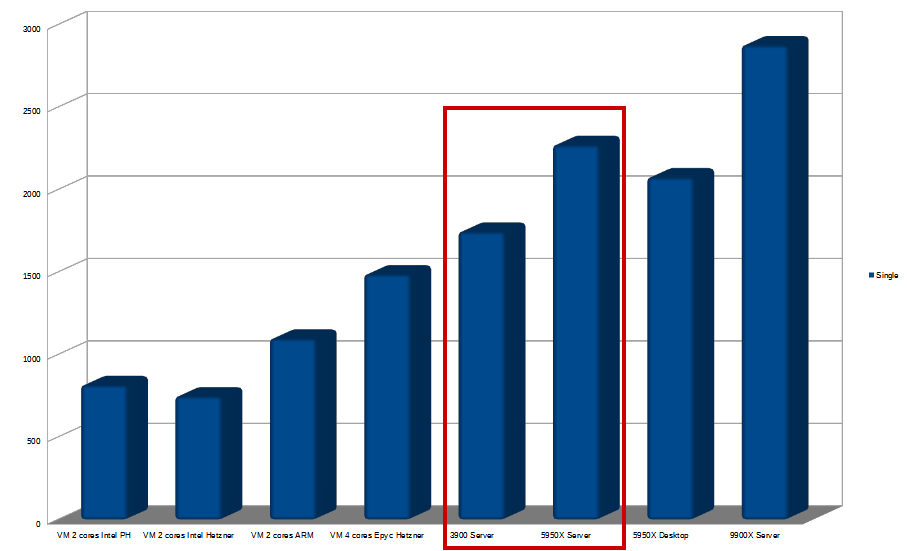
The least efficient is the single thread on an Intel VPS from Hetzner, and the most efficient is the single thread on an AMD R9 9900X VPS from PulseHeberg. The latter, however, is a UFO in the VPS world, offering performance that defies belief (and unfortunately a victim of its own success since its release, with very limited stocks). So we won't be taking any special account of it for the time being, but it simply gives us an outlook for the future.
A special mention for Pulseheberg, which has the merit of clearly indicating on its site that virtualisation hosts use Intel Xeon E5-2680v4 (14 cores 28 threads, 2.4-3.3Ghz).
VPSs with ARM processors are still going strong and are ahead of our Intel VMs. However, they can't beat AMD and its famous Epyc, but it's worth remembering that ARM offers a significant gain in terms of power consumption, which is not insignificant for a data centre.
In fact, Epyc CPUs are almost 2x more powerful than Intel CPUs at Hetzner, with a rounded x1.99 improvement.
Comparing the slowest VPS and the LRob dedicated servers, we can see that the Ryzen 3900 and 5950x respectively deliver x2.33 and x3.03 single-threaded performance gains.
Starting with the best CPU available in virtualised mode (AMD Epyc at Hetzner) and moving on to the LRob dedicated servers, we still achieve performance gains of x1.17 and x1.52 respectively. Note that the server with a Ryzen 3900 was in production at the time of the benchmark, so its measured performance is lower than its actual performance.
Multi-threaded performance
In multi, there are two ways of looking at the results: on the one hand, the raw performance, and on the other, seeing to what extent the gain is proportional to the number of cores. With the latter approach, we can get an idea of the power and saturation of the VM host. Because we're never alone on it.
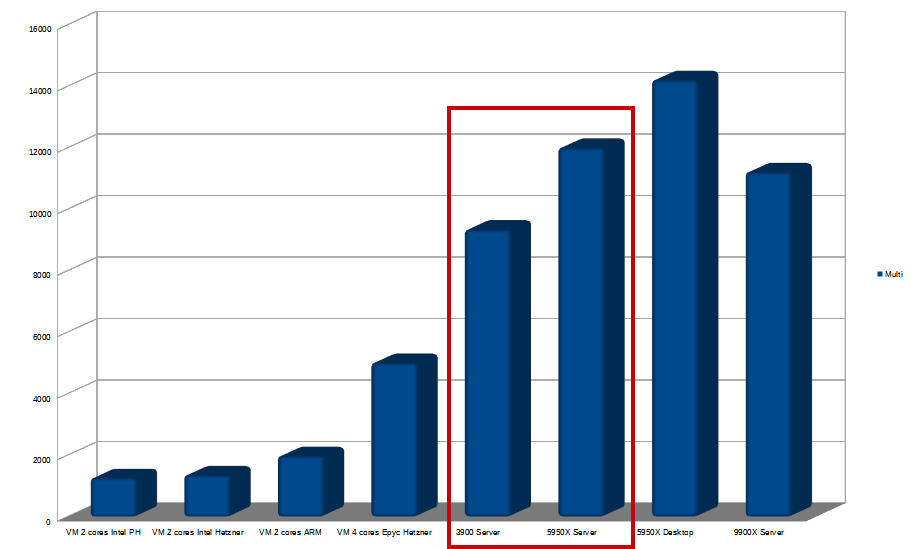
The «ratio» approach»
For 2-core VMs, where a perfect score would be x2 in multi: at PulseHeberg on the 2-core VM, we're only x1.54 compared with our single score. Hetzner, on the other hand, scores x1.8 on its 2-core Intel VM. We can imagine that Hetzner has faster CPUs on its hosts or a lower fill rate. The same applies to ARM with x1.79, which can also be explained by the large number of cores on ARM virtualisation hosts.
In 4-core VM, where a perfect score would be x4, Hetzner gives us a respectable x3.36 on the Epyc VM. With Epyc CPUs going up to 64 cores and more while maintaining a comfortable frequency, this is very consistent with expectations.
On the dedicated side, on the Ryzen selected by LRob, we have x5.3 single performance, whether on the 3900 or 5950x, where we would expect x12 or x16.
To be exact, the 12 cores 24 threads Ryzen 3900 gives us a stack x5.3. The 16 cores 32 threads Ryzen 5950x gives us a x5.28. So why doesn't it scale more? Because the CPU frequency is highly dynamic on these models. So, at low load, when only a few cores are used, you get much better performance. In other words, you get the best results on these CPUs by making sure you don't have too high a load.
In the desktop version for controlling the 5950x (I happen to have the same one at home!), with a hand-optimised frequency set at 4.4Ghz, we start from a lower single score, but in multi, we end up with a x6.84. The result is significantly better than the server, but with much higher power consumption, which would not be viable in a data centre.
As for the UFO VM, the 8 cores on PulseHeberg's Ryzen 9 9900X, this only gives us a small x3.89... But this should be put into perspective, because the raw performance is still exceptional for an 8-core, outstripping the Ryzen 3900 (12 cores) and approaching the performance of the Ryzen 5950x. Great prospects for the future.
Gross performance
Let's now look at the total load supported by these various machines.
Let's compare the best Intel dual core machine with our dedicated :
The Ryzen 3900 in prod is 6.89x the score.
The Ryzen 5950x, x8.86 the score.
For the record, I've already seen machines like these 2 Intel VM cores host 50 sites without too many problems. Which means that with 7x the performance you could host 350 sites. However, we've decided to stop at around 200 to 250.
Faced with the fastest Epyc 4 cores :
The Ryzen 3900 prod is 1.86x the score.
The Ryzen 5950x scores 2.39x.
Performance by core
On our dedicated CPUs, single-core performance is much better than on almost all servers, but multi-core performance is much lower than on ARM or Epyc.
It's a choice: By not overcrowding such servers, you get drastically better performance in everyday life, while not collapsing completely during peak loads. The aim is to ensure that even peak loads are below 50% of total usage.
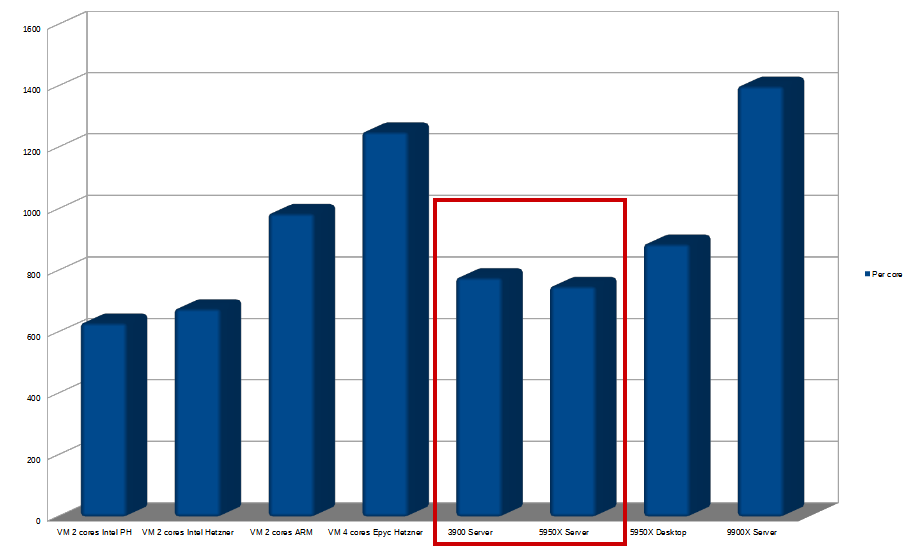
So, yes, performance per core drops... But on the other hand, we have a much greater number of cores! Moral: To maintain maximum performance, you have to make sure you never get into this worst-case scenario (and that's what we do at LRob!).
IO performance (read/write)
IO speed is the speed of reading and writing to your server's disk. This has an impact on many elements, but MySQL (and MariaDB) is the element that certainly benefits most from an excellent IO. And better MySQL performance means a faster site, a processor that doesn't wait for disk operations to complete, and ultimately, optimal performance.
For practical reasons, we have simplified the tests in this section by reducing the number of machines tested to those that are most relevant.
We use the Linux benchmark «fio». The benchmark command used produces 75% of reads and 25% of writes, all in random 4K files:
fio --randrepeat=1 --ioengine=libaio --direct=1 --gtod_reduce=1 --name=fiotest --filename=testfio --bs=4k --iodepth=64 --size=8G --readwrite=randrw --rwmixread=75Gross values :
| Server | Type | Read IOPS | Write IOPS | Read MB/s | Write MB/s |
|---|---|---|---|---|---|
| VM Intel PH | «SSD RAID 10 storage units» | 14,2 | 4,7 | 58 | 19,4 |
| VM ARM Hetzner | «highly available and reliable SSD-based storage» | 41,4 | 13,8 | 169 | 56,6 |
| Ryzen 3900 Hetzner | SSD NVMe RAID 5 soft | 110 | 36,8 | 451 | 151 |
| Ryzen 5950x Hetzner | SSD NVMe RAID 1 soft | 114 | 38,1 | 467 | 156 |
| 9900x PH | «Local NVMe disks» | 121 | 40,5 | 496 | 166 |
Simultaneous read/write speeds :
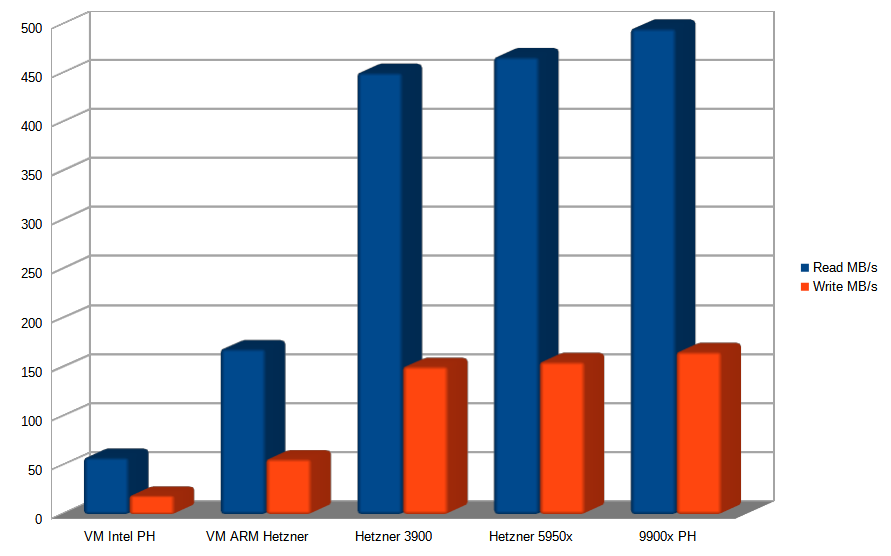
Even more important, but ultimately quite proportional to data rates, is the number of simultaneous read/write operations per second:
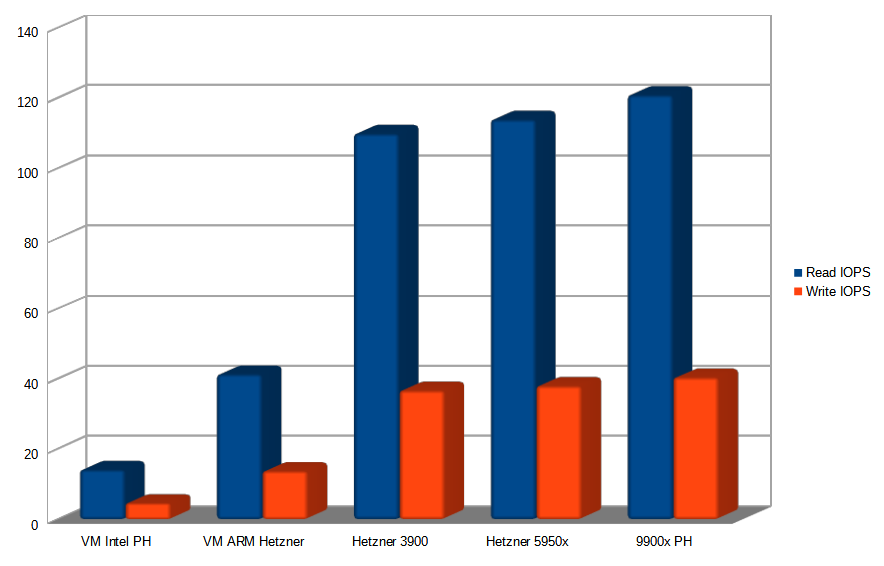
What can we deduce?
Like many, PulseHeberg probably uses conventional SATA SSDs for its Intel VMs, which results in the lowest score here. On the other hand, for their Performance Cloud offerings, they have clearly selected good NVMe drives, taking the lead in this benchmark.
ARM and Hetzner are probably using NVMe SSDs or SATA with a RAID controller card. The throughputs are decent but nothing more. What's more, if a SAN is used, the throughput may vary over the course of the day.
On a dedicated server with local NVMe SSD RAID, you get very solid performance. The difference between our two machines is of the order of a margin of error, probably due to the fact that the Ryzen 3900-based server is in production.
In write mode (the most critical for MySQL), we're 8.1x faster than the slowest machine, and 2.76x faster than Hetzner's ARM VM (which is already a respectable score for a VPS).
Compared with most of the VPS offers you see, the average should be somewhere between these two, with LRob servers around 5x faster than the norm found on VPSs.
In practice, this translates into a MySQL server that executes tasks quickly and is never saturated, and as a result, sites that are always as responsive as possible. In absolute terms, we have never observed disk I/O saturation on such a configuration in normal use.
How does LRob choose its servers?
Of course, the No. 1 criterion is performance.
Virtual servers whose performance is too random are out of the question for web production.
To meet our requirements, dedicated servers with NVMe SSDs and 128GB RAM are an unquestionable prerequisite.
As far as CPUs are concerned, we choose those with the best single-core performance, while offering solid multi-core performance.
The main partner chosen for LRob servers to date has been the unrivalled Hetzner, which shines through with its eco-responsibility and the quality of its support with a 24/7 team in the datacenter.
Why not choose Epyc processors?
This is a legitimate question. With an Epyc 32 cores or more, the total capacity would be much higher. But this would be a bad strategic choice for 3 reasons:
- On the one hand, under moderate load, we get better final performance for each of the hosted sites, using Ryzen. In single core, our 5950x is up to 1.52x more powerful than an Epyc.
- On the other hand, there's the cost: Epyc machines are very expensive, so they take longer to pay for themselves.
- Finally, it increases the risk unnecessarily: making an Epyc machine profitable would mean putting a huge number of sites on it. And yet, LRob for reliability and scalability, we think it's better to have a few more medium-sized servers than fewer large ones. In the end, we already host more than enough sites on Ryzen without any slowdowns.
For the time being, this is not yet a reality, but we're obviously keeping an eye on CPU releases and on what hosting providers are offering.
What about the network?
Network consumption is often over-estimated, or slowness is unfairly attributed to it. A slow site does not mean a slow network, but rather a slow server that struggles to generate pages and/or a poorly optimised site.
The average network usage of a shared server rarely exceeds 50Mbit/s, with an average of around 10Mbit/s (thanks to webmasters for optimising their sites!).
But all the servers are gigabit, so 1000Mbit/s is available. There's plenty of room for improvement!
In the end, it is more backups and migrations that benefit from these high speeds.
How does LRob perform?
In practice, how does LRob's performance compare with that of other web hosts?
Without being able to quote the source hosts (legally you could be accused of denigration), we can tell you that LRob does better than almost all the hosts tested.
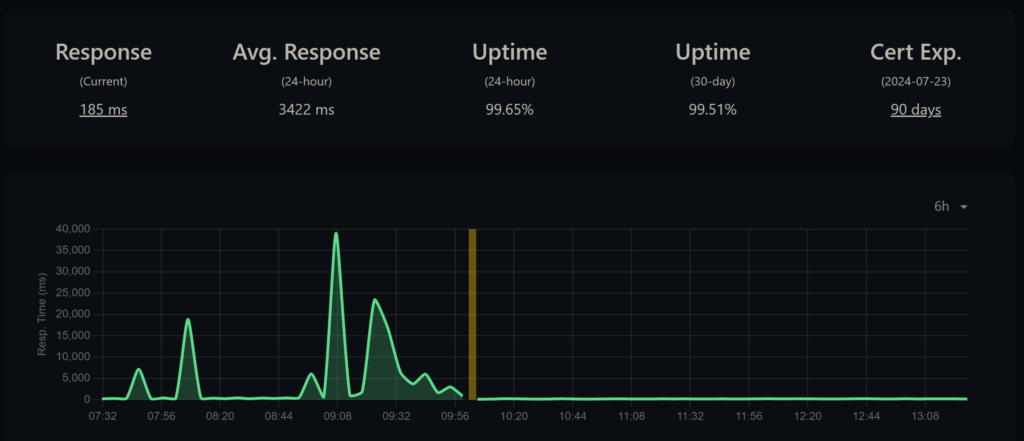
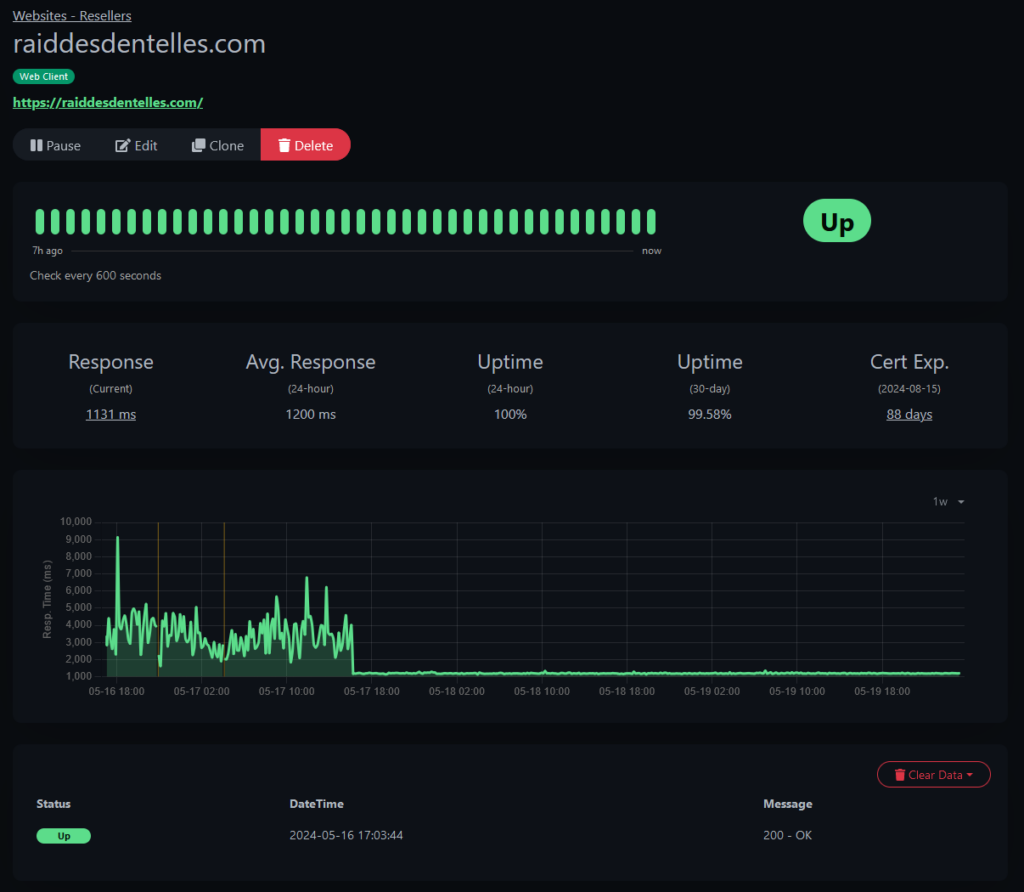
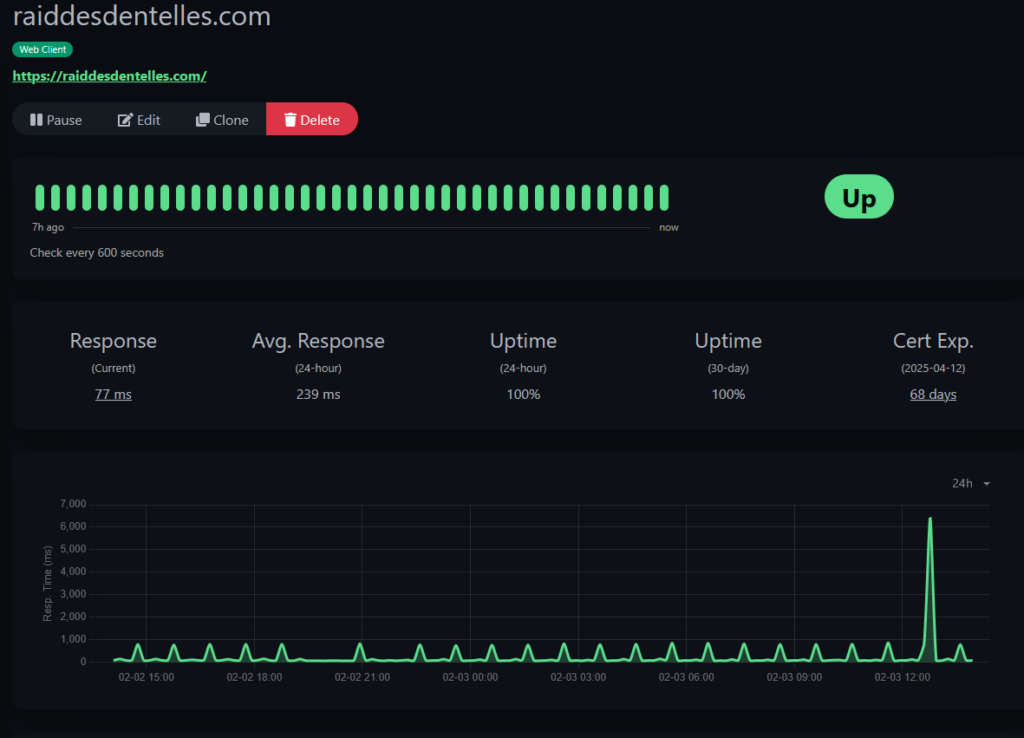
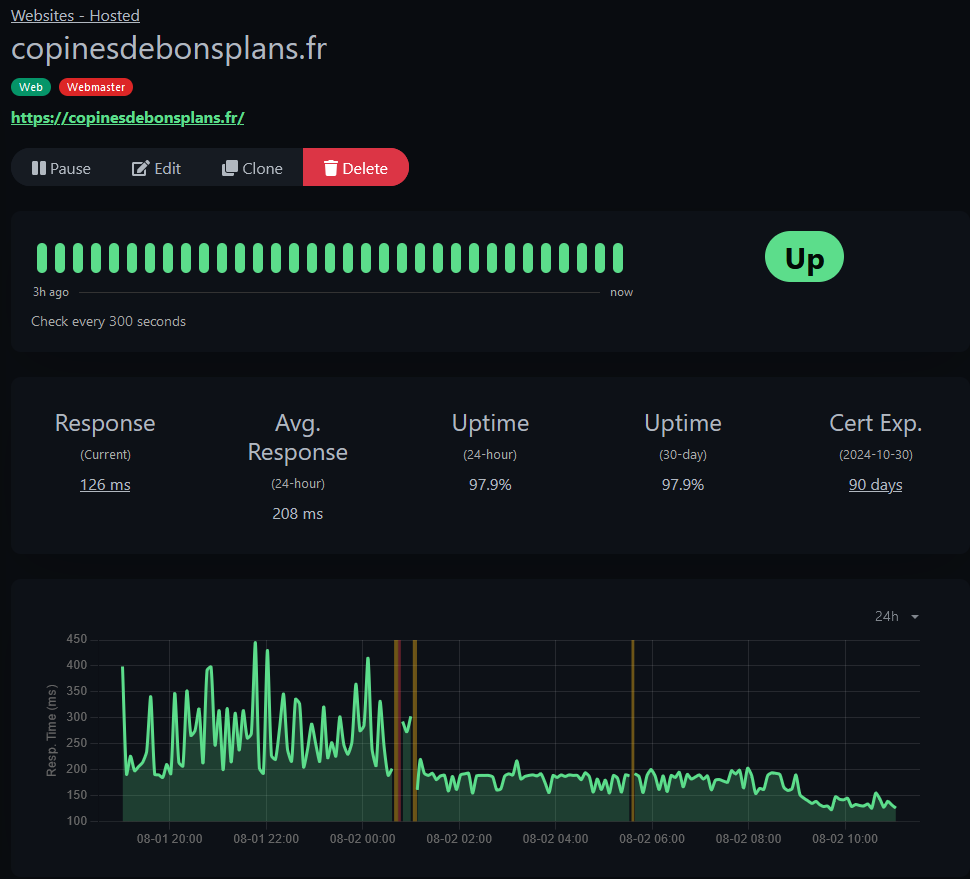
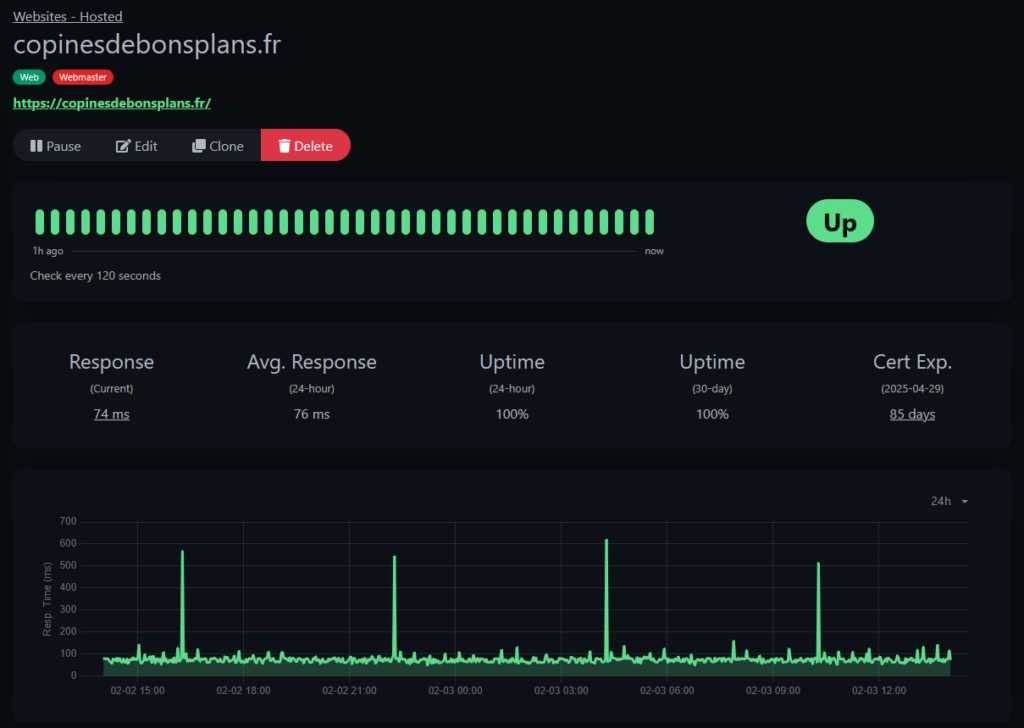
We have migrated hundreds of sites to the LRob infrastructure. Only once did we see no gains. It was a historic and annoying event. In all the other cases, we've seen sites load 2 to 10x faster, with even some sites loading 20x or even 30x faster once a cache has been set up or adjusted. And all with stable speeds over time.
We now have a fine collection of before-and-after migration graphs, an extract of which is shown below:
See the full load test
root@srv01 ~ # ab -c 200 -n 10000 https://copinesdebonsplans.fr/
This is ApacheBench, Version 2.3
Copyright 1996 Adam Twiss, Zeus Technology Ltd, http://www.zeustech.net/
Licensed to The Apache Software Foundation, http://www.apache.org/

Benchmarking copinesdebonsplans.fr (be patient)
Completed 1000 requests
Completed 2000 requests
Completed 3000 requests
Completed 4000 requests
Completed 5000 requests
Completed 6000 requests
Completed 7000 requests
Completed 8000 requests
Completed 9000 requests
Completed 10000 requests
Finished 10000 requests

Server Software: nginx
Server Hostname: copinesdebonsplans.fr
Server Port: 443
SSL/TLS Protocol: TLSv1.3,TLS_AES_256_GCM_SHA384,4096,256
Server Temp Key: X25519 253 bits
TLS Server Name: copinesdebonsplans.fr

Document Path: /
Document Length: 114955 bytes

Concurrency Level: 200
Time taken for tests: 47.842 seconds
Complete requests: 10000
Failed requests: 0
Total transferred: 1153600000 bytes
HTML transferred: 1149550000 bytes
Requests per second: 209.02 #/sec
Time per request: 956.846 ms
Time per request: 4.784 [ms] (mean, across all concurrent requests)
Transfer rate: 23547.42 [Kbytes/sec] received

Connection Times (ms)
min mean[+/-sd] median max
Connect: 4 881 110.1 897 1005
Processing: 36 65 86.2 53 975
Waiting: 26 55 85.1 43 958
Total: 90 946 79.3 950 1183

Percentage of the requests served within a certain time (ms)
50% 950
66% 962
75% 970
80% 977
90% 1004
95% 1017
98% 1040
99% 1061
100% 1183 (longest request)
So how can you be sure you're choosing the fastest web host?
A good way to do this is to choose a web host capable of transparency, as we are doing here.
Our advice is to take a step back from pre-conceived ideas and marketing and look at the measurements and real data (hardware, architecture), or even better, take your own measurements.
At LRob, we do everything we can to ensure that everyone can benefit from the maximum resources for their site, at all times.
In addition to material choices, internal policy also plays a key role:
Good management of the fill rate and effective blocking of attacks work wonders. So, in the event of a spike, we check its origin and correct it if necessary with the owner of each site. Yes, we take the trouble to contact them one by one. And what do you know? It works! Because everyone is always happy to speed up their site.
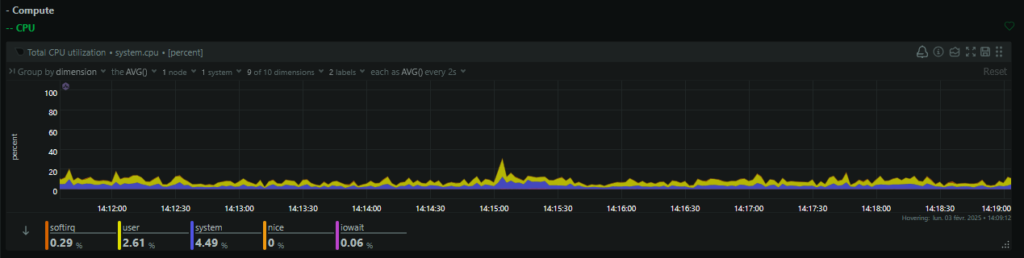
In the end, we aim to achieve an average CPU load of around 20% and a peak load of 50%, which leaves plenty of room to absorb peaks in activity without slowing down.
Instead of overfilling each server, we consider that the server below is almost full, requiring the deployment of a new machine for future clients:
If you find this transparent policy ideal and would like to benefit from it for your websites, book your LRob hosting now! And be among the first to benefit from hosting on a Ryzen 9 5950X with local NVMe SSD!


Leave a Reply
You must be logged in to post a comment.