

Many people wonder how WordPress can be vulnerable to attack despite its popularity and following. Others are completely unaware of the risk. Analysis.
What is a vulnerability?
WordPress is programmed using the PHP language.
PHP code is used to create «dynamic» websites. In other words, the content is generated on each page by a PHP program. A dynamic site also allows interaction with visitors. In technical terms, it allows requests to be received and processed.
This strength is also a weakness in that it can leave room for unwanted interactions, enabling a website to be hacked.
This is known as a «security flaw» or «vulnerability».
Vulnerabilities in PHP

Vulnerabilities in PHP code can have various causes.
Here are some common examples.
- Unvalidated input : When PHP code accepts user data, such as a form or query, without proper validation, it can be vulnerable to malicious code injection attacks.
- Excessive permissions: Assigning excessive permissions to files and users can enable unauthorised manipulation attacks.
- Poor error handling: Revealing sensitive information in error messages can give attackers clues to further exploit the system.
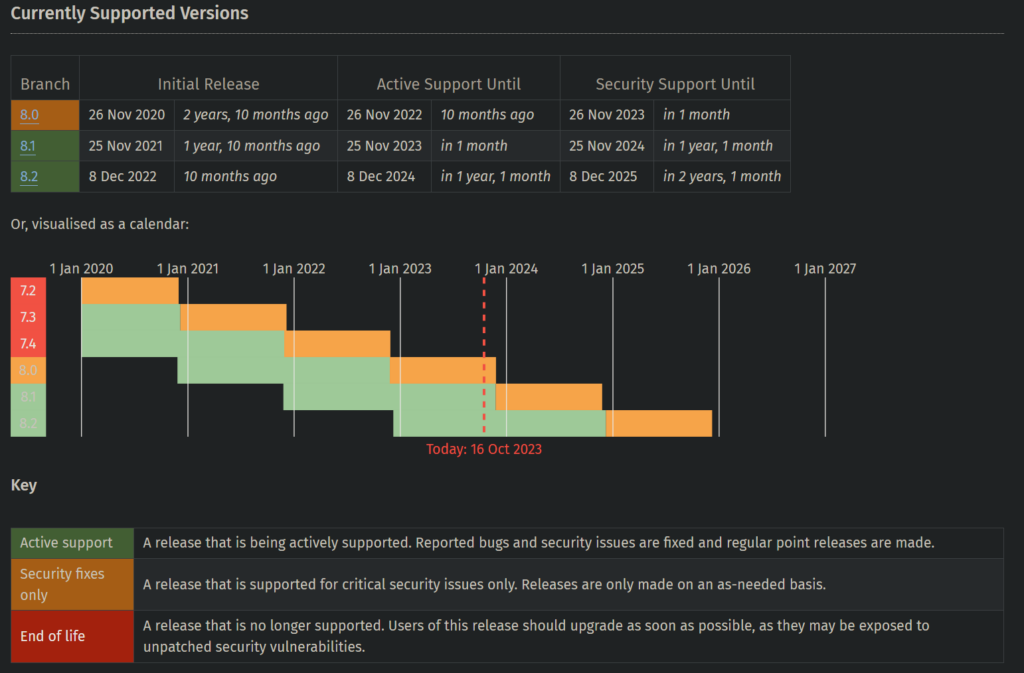
In addition, there may be vulnerabilities in PHP. The PHP executor itself sometimes contains security flaws if it is not kept up to date. (see image)
Other flaws not directly linked to PHP, such as XSS flaws, are also common. These allow malicious code to be executed.
We'll look at how this works in practice for WordPress.
WordPress site vulnerabilities
Security holes in WordPress

WordPress is a robust content management system, but it contains nearly a million lines of PHP code (924,096 lines currently).
WordPress is also 59,772 plugins and 11,378 themes available on wordpress.org. Millions more lines of code available for installation on your site.
This wealth of code creates fertile ground for security flaws. The more you multiply the code, the more you multiply the risk. Every day, new vulnerabilities are discovered. They can be found in the heart of WordPress, but also in installed themes and plugins.
Detecting, correcting and revealing vulnerabilities
If a party detects a flaw (an individual developer, a «white hat», a specialist security organisation), it notifies the developers of the script containing the flaw.
If the developers are reactive, they will correct the flaw and publish the patch.
Then, typically 30 to 90 days after its discovery, the security flaw is revealed publicly. This is done both to give credit for the discovery to the whistleblower, and to warn users of the script of the risk involved in failing to update it.
Current flaw not corrected
WordPress currently has a uncorrected flaw since version 6.1.1 (i.e. several months ago). This allows a website to be used to execute requests to other targets. It can be mitigated by blocking access to xmlrpc.php and disabling WordPress pingbacks (this was done on all the sites I manage even before this flaw was detected).
When is WordPress vulnerable and what should I do?
Vulnerabilities revealed
When a vulnerability is revealed, all installations with the vulnerable script are inherently affected. Hackers are likely to exploit the flaw if this is the case for you.
There are two types of vulnerability:
- Your site contains a script (WordPress, plugin, theme) with a known vulnerability that has not been corrected by the developers. Development of this script may have been abandoned. In this case, you should disable the script or replace it with a non-vulnerable script that is better monitored by its developers.
- Your site is not up to date. You have not corrected the security flaw. So you need to update your site as regularly as possible and make sure you don't have any obsolete scripts (which could potentially put you in the same situation as above in the long term).
Zero-day vulnerabilities«
Sometimes hackers will find a vulnerability before it is revealed and then corrected. They will exploit it directly. This is known as a zero-day vulnerability.
The more popular a script is, the more likely it is that hackers will look for zero-day vulnerabilities in it. It's rare, but it happens.
Here's another reason to design simple sites: the more popular plugins you use, the more vulnerable your WordPress site will be. Not just to zero-day vulnerabilities, but to vulnerabilities in general.
To protect against 0-day vulnerabilities, the server hosting your site must be secure. To do this, it can block suspicious requests from hackers using an application firewall. Then block attacking IPs with fail2ban, for example. This is not generally the case with shared hosting packages. With the exception of’HaiSoft with whom I've pushed these security measures, which has greatly reduced the number of hacks. But this can lead to false positives: Requests blocked when they are legitimate, particularly with WordPress builders (Elementor, Divi, WP-Bakery and others). The technical support required is then higher, which is why most service providers do not implement this type of security. Security is always more complex than no security.
Despite all the possible security measures in place, you should bear in mind that some hacker requests can slip through the net. There is no such thing as zero risk, and anyone who claims otherwise is either ignorant or a liar.
Since perfect security doesn't exist, assume that your site could be hacked tomorrow. If that happens, what do you do? You'd better have an up-to-date, easily restorable backup that is not stored on your site.
Conclusion
Hacking doesn't just happen to other people. On a regular basis, owners of WordPress sites come to see me with a problem. hacked website to be repaired.
Any computer system is potentially vulnerable, including your WordPress site. The challenge is to minimise the risks of hacking by applying all the necessary preventive measures. This starts with an up-to-date, secure server capable of blocking attacks. Then, it means regularly monitoring your WordPress site and updating it as often as possible, constantly checking for known security holes and taking swift action in the event of a problem. In all cases, an outsourced, automated and independent backup of your site should be carried out on a daily basis. This is precisely the set of services you'll find in my Webmastering WordPress.
If your site is important to your business, don't wait to be hacked, take the initiative and have your site checked by a WordPress security audit or go directly to my Webmastering.
Leave a Reply
You must be logged in to post a comment.